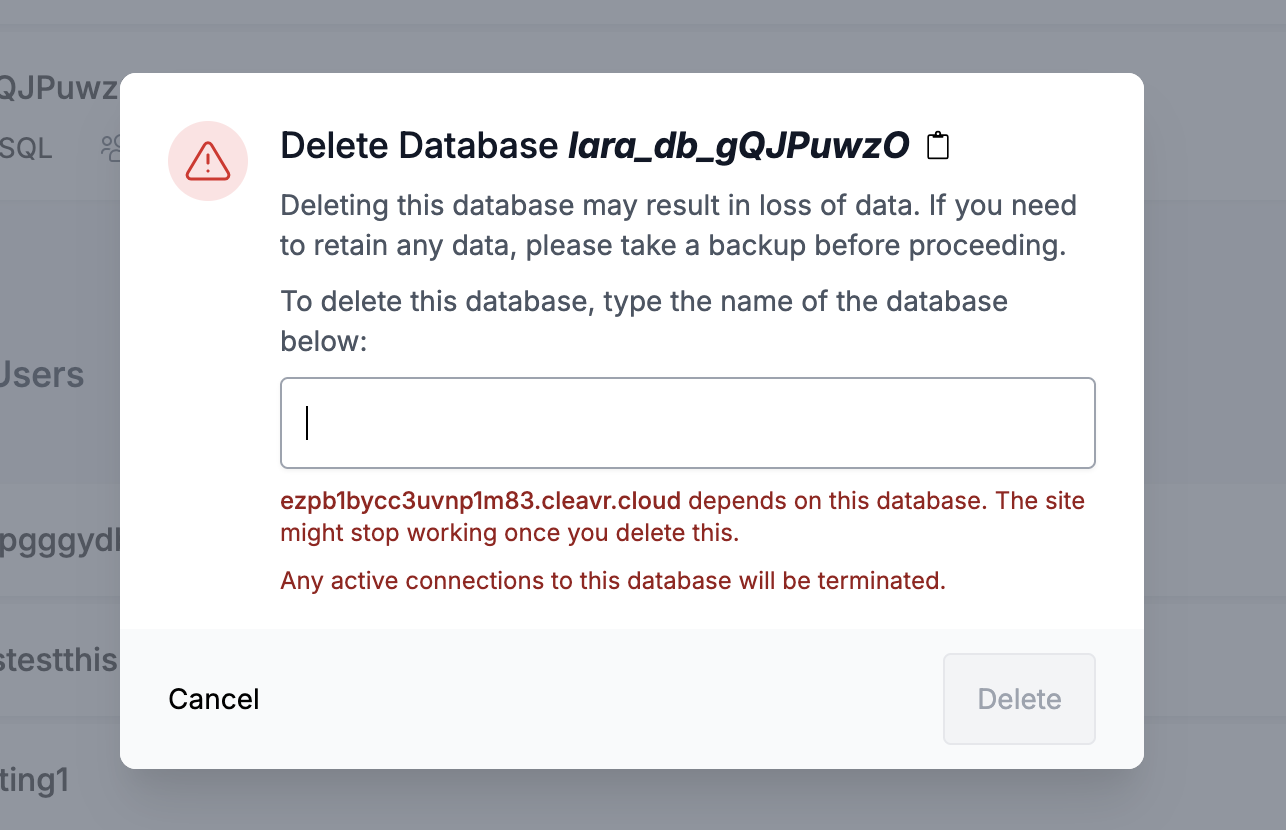
Deleting a PostgreSQL database in Cleavr while it’s still actively used by a running Strapi 5 app removes it from the Cleavr UI but does not drop it on the DB server. After that, attempting to create a database with the same name in Cleavr consistently returns “Error creating database”, even though the database is actually created on the DB server.
Description
Environment
Provider: Hetzner (separate App server + Database server)
Database: PostgreSQL
Backend: Strapi 5
Managed via Cleavr
Problem
I created a PostgreSQL database on the DB server and a Strapi site on a separate app server.
I configured the DB credentials in the Strapi .env and started the app (active DB connection).
Without stopping the app, I deleted the database from the Cleavr interface.
Cleavr removed the database from the UI, but the database still existed on the DB server because it was still in use / had active connections.
Cleavr did not warn or prevent deleting an “active/in-use” database.
To fully remove it, I must stop the app or manually terminate PostgreSQL connections, then drop the database.
After that, when I try to create a database again in Cleavr using the exact same database name, Cleavr always shows: “Error creating database”.
However, the database does get created on the DB server successfully.
Cleavr then fails to reflect/manage it properly in the UI, so the UI state becomes inconsistent with the real server state.
Expected behavior / Suggestions
When deleting a database with active connections:
Show a clear warning and block deletion, or provide an option to safely terminate sessions and drop it properly.
When creating a database:
If creation succeeds on the server, Cleavr should not return an error, and it should always display/manage the DB correctly in the UI.
Add visibility on app connections:
It would be helpful to show which database an app/site is currently connected to (or last known DB connection) to avoid accidental deletion of an active DB.
Impact
Inconsistent state between Cleavr UI and the actual PostgreSQL server.
Misleading error message during DB creation (UI says failure while server succeeds).
Extra manual steps and risk of orphaned/untracked databases.
Quick update from my side: after spending a few hours digging into it, I think I found the underlying cause and a reliable workaround.
It seems the issue happens when the DB (or its role/user) is deleted in Cleavr while it’s still in use or when the cleanup order is changed. That can desync the Cleavr UI state from what still exists on the PostgreSQL server (active connections prevent a proper drop, and deleting the role first can also leave leftovers on the server).
Working “clean” order (for a PostgreSQL DB used by an app):
Stop the app (disconnect active DB sessions)
Delete the database in Cleavr
Delete the database user/role (the role tied to that DB)
If the order changes, problems appear:
Deleting the DB without stopping/disconnecting the app removes it from Cleavr UI, but it may remain on the DB server due to active sessions.
Deleting the DB user/role before deleting the DB removes it from Cleavr UI, but the role can still remain on the server.
Suggestion (UI improvement):
It would be really helpful if Cleavr made this more obvious in the UI to prevent accidental “wrong order” deletion. For example:
Show a warning/block when deleting a DB that still has active connections (or when a site is connected to it).
Provide a button like “Stop site / disconnect + delete safely” (or “terminate sessions + drop”).
When deleting a DB user/role, show a warning if it’s still referenced/linked to a database.
This would make the correct workflow clearer and reduce the risk of UI/server state getting out of sync.
Deleting that database clears the entire view (hides all roles/users)
Even though roles/users still exist in Cleavr’s records
This makes it impossible to see and clean up orphaned roles
With multiple databases, roles/users remain visible after deletion
Result:
Orphaned database users remain in Cleavr’s records but are hidden
When trying to create a new database with the same username, you get “Username must be unique” error
The role doesn’t exist in PostgreSQL, but Cleavr still thinks it does
Users can’t reuse usernames after deleting the last database
Expected behavior:
Keep the Database Users list visible even when no databases exist, so orphaned roles can be cleaned up
Or automatically remove the associated database user when deleting a database
How I discovered it:
I created another database with a new database user/role, and it was created successfully. Then the view showed both the old orphaned role and the new one, revealing that the old role was still in Cleavr’s records but hidden when no databases existed.
Thank you for the detailed feedback. We’ve just released an update that addresses the issues you highlighted. Please give it a try and let us know whether the fix resolves the issue for you.
Active connections are now terminated before deleting a database, and the warning message has been improved. To properly delete a database, active connections must be terminated.
For databases created during site creation, the UI continues to show the association and the warning message. (P.S. It was already there)
These changes should prevent the issues you’ve mentioned and the “Error creating database” problem.
If you have older databases that were shown as deleted in Cleavr but still exist on the server, and you would like us to help clean them up, feel free to send me a direct message with the server name and database names, and we can jump in to get them deleted.
Please let us know if you have any other issues or questions, or if we have missed any of the points you mentioned.
 Working “clean” order (for a PostgreSQL DB used by an app):
 If the order changes, problems appear:
 ,
,